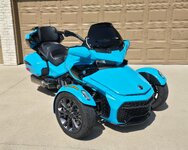
Housekeeping post that appears in every Ad:
Please make sure that you, both sellers and potential buyers, read and follow the directions in the
READ FIRST! Sticky (& all the posts in that thread) that's found at the top of this forum section and linked below:
https://www.spyderlovers.com/threads/read-first-how-to-use-the-for-sale-by-owner-sub-forum.146354/
paying particular heed to:
- the need for regular posts from you, adding to the thread (& not just edits of the first post!) in order to keep the Ad alive;
- if you add any pics (and you really should, if you want to sell!), the need to insert no more than 6 images per post as thumbnails iaw the 'Please upload, attach, and insert any pics/images as Thumbnails' Sticky (see link below), especially if you want everybody to be able to view them/your Ad, leaving at least a - between each image! (Having at least one pic in your opening post of the Ad/thread will mean that your Ad will have the first pic shown in your 1st post here appear on the index page - which helps get viewers to look at what you've got/on offer; and posting an extra pic or two in new posts added to the Ad/thread regularly over the coming weeks/months will also satisfy the first point above
 );
);
- do not display personal contact details, unique identifiers, or discuss prices, payment, payment methods, or negotiate at all on the public pages, use the Forum's DM facility to exchange contact details &/or conduct any/all negotiations; and
- the need to properly finalise the Ad by changing the prefix to mark it Sold once you've finished with it, even if you haven't actually 'sold' anything, don't want to sell any more, or just don't need the Ad any longer!
Good Luck with your sale.

Here's the link re posting pics:
Housekeeping post that appears in every Ad:
Please make sure that you, both sellers and potential buyers, read and follow the directions in the
READ FIRST! Sticky (& all the posts in that thread) that's found at the top of this forum section and linked below:
https://www.spyderlovers.com/threads/read-first-how-to-use-the-for-sale-by-owner-sub-forum.146354/
paying particular heed to:
- the need for regular posts from you, adding to the thread (& not just edits of the first post!) in order to keep the Ad alive;
- if you add any pics (and you really should, if you want to sell!), the need to insert no more than 6 images per post as thumbnails iaw the 'Please upload, attach, and insert any pics/images as Thumbnails' Sticky, especially if you want everybody to be able to view them/your Ad, leaving at least a - between each image! (Having at least one pic in your opening post of the Ad/thread will mean that your Ad will have the first pic shown in your 1st post here appear on the index page - which helps get viewers to look at what you've got/on offer; and posting an extra pic or two in new posts added to the Ad/thread regularly over the coming weeks/months will also satisfy the first point above );
- do not display personal contact details, unique identifiers, or discuss prices, payment, payment methods, or negotiate at all on the public pages, use the Forum's DM facility to exchange contact details &/or conduct any/all negotiations; and
- the need to properly finalise the Ad by changing the prefix to mark it Sold once you've finished with it, even if you haven't actually 'sold' anything, don't want to sell any more, or just don't need the Ad any longer!
Good Luck with your sale.
Here's the link re posting pics as thumbnails:
If you've been trying to add pics/images/attachments without success, or if you can still see the word 'Attachment' in your post above any pics once you've posted them, then the most likely issues are that you're either not finishing the upload, attach, and insert (as a thumbnail!) process; or your source image/file is simply too large! So for the former, you need to finish the job properly; the latter, either scale it down or re-size it smaller until it will upload (see the links in posts #6 & #9 of this thread for tools to help you do that.)
When you are adding...
Ps: Please see and follow the directions in the Notifications re this Ad in and in each of your other Ads - failure to follow the directions in the notifications and the linked Stickies in the post above may result in the restrictions mentioned in them being applied!


 -
- 
 -
-