
• There were many reasons for the change of the site software, the biggest was security. The age of the old software also meant no server updates for certain programs. There are many benefits to the new software, one of the biggest is the mobile functionality. Ill fix up some stuff in the coming days, we'll also try to get some of the old addons back or the data imported back into the site like the garage. To create a thread or to reply with a post is basically the same as it was in the prior software. The default style of the site is light colored, but i temporarily added a darker colored style, to change you can find a link at the bottom of the site.

10.25” Display, Apple CarPlay, miles to empty or fuel remaing

mecsw500

Active member
It seems whilst running Apple CarPlay on the 10.25” display there is no way to see fuel level or miles to empty.

Knowing this data whilst using a maps application is rather an essential piece of data to know, especially out here in the sparsely populated areas of the Western US where gas stations can be 100+ miles apart, depending upon the route.

It should have put that data on the left hand side of the screen at least in some form,.

I filed a bug report with BRP.
 
It seems whilst running Apple CarPlay on the 10.25” display there is no way to see fuel level or miles to empty.

Knowing this data whilst using a maps application is rather an essential piece of data to know, especially out here in the sparsely populated areas of the Western US where gas stations can be 100+ miles apart, depending upon the route.

It should have put that data on the left hand side of the screen at least in some form,.

I filed a bug report with BRP.
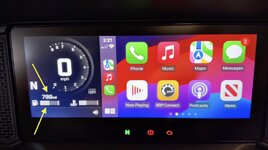
Fuel level? Looks to be on the left hand side at the bottom, next to the fuel pump symbol. To the left of the coolant temp. And can't that miles be switched to Miles To Empty?

Screenshot 2026-06-10 at 9.34.12 AM.jpg
 
Last edited:
That’s odd, mine doesn’t show that.

I’ll go through the setup again. Perhaps I configured something wrong.

Mine doesn’t have anything down there.

I’m on firmware V 5.1.0, I done know if that makes a difference, I’m going to do a reset and start again.

Thanks for the info.
 
Fuel level? Looks to be on the left hand side at the bottom, next to the fuel pump symbol. To the left of the coolant temp. And can't that miles be switched to Miles To Empty?

View attachment 255369
Thank you, I reset my configuration changes and started again so I see what you see.

Several other oddities were fixed too. I think I had been messing so much with Bluetooth configurations and various other things it had got a little confused.

Now it works as it should. In full screen the fuel level was showing the same level before and after I filled the tank and would only start dropping after the fuel level went below what it was when before I filled it up. Now it shows full as the tank is actually full.

Thank you for the info. I’m much happier now.
 
Back
Top