• There were many reasons for the change of the site software, the biggest was security. The age of the old software also meant no server updates for certain programs. There are many benefits to the new software, one of the biggest is the mobile functionality. Ill fix up some stuff in the coming days, we'll also try to get some of the old addons back or the data imported back into the site like the garage. To create a thread or to reply with a post is basically the same as it was in the prior software. The default style of the site is light colored, but i temporarily added a darker colored style, to change you can find a link at the bottom of the site.

2018 F3T totally dead - any thoughts or advice?

Wheelman

Member
Last week my 2018 F3T decided to give me starting problems. It started with a "Check Key" notification. I took the key out, walked away for about 5 minutes and when I tried to start it again, I got a check engine light. After this, it started. Took it for about a 1 hour ride. Stopped and it did all of the above again. I was able to get it started and got home. After checking the battery terminals, I tried to start it again and now it was totally dead. Tested the battery and it was bad. Replaced the battery with the Lamonster lithium battery and I get nothing. No clicking, whirring or display on the dash. TOTALLY DEAD! All the fuses are good and the main power relay tested good. All the ground wires are tight. My only thought now is maybe it is not reading the key. I only have one key. I really don't want to tow it the local dealer cuz I don't trust them. Any thoughts or advice would be much appreciated.
 
I don’t know what the solution is to get it started but if you can, I would get the DESS disabled as soon as you can. Then you would have no more problems with the key. The DESS can easily be disabled with BUDS but some dealers won’t do it while others will.
 
I assume you fully charged the new lithium battery first, before hooking it up, or using it to try to power up the Spyder?

I understand DESS disabling the starting/running of the machine, but I don't understand you not getting any lights on the dash if DESS is the problem.

What did you use to test the old battery to determine it was completely dead?
 
I don’t know what the solution is to get it started but if you can, I would get the DESS disabled as soon as you can. Then you would have no more problems with the key. The DESS can easily be disabled with BUDS but some dealers won’t do it while others will.

The DESS was one of my thoughts also. I guess I can call the dealer and see if they will do it or find someone local (SoCal) who has BUDS and I can pay them to do it. Thanks for your response.

I assume you fully charged the new lithium battery first, before hooking it up, or using it to try to power up the Spyder?

I understand DESS disabling the starting/running of the machine, but I don't understand you not getting any lights on the dash if DESS is the problem.

What did you use to test the old battery to determine it was completely dead?

Yeah, charged the battery as soon as I got it. Also, checked the kill switch. Learned the hard way to check that first. I put the old battery on a charger, it gave one click and then nothing. Disconnected it and tested it with a multi-meter and got 9.5 volts. It won't take a charge.
 
The 2018 Can-Am Spyder F3-T is not highly prone to the notorious DESS (Digitally Encrypted Security System) "Bad Key" error.
While older Spyder models - specifically the 2014 and 2015 model years - suffered from a massive wave of faulty DESS modules that frequently left riders stranded, BRP updated the hardware in subsequent years. By 2018, the failure rate for the actual DESS module itself dropped significantly.
However, if you are experiencing an intermittent "Bad Key" or DESS error on a 2018 model, the issue is typically caused by one of the following culprits:

Common Triggers for a 2018 DESS Error

• Weak or Dying Battery: The Spyder's computer systems are incredibly sensitive to voltage drops. If your battery is weak or has loose terminals, the antenna won't get enough power to read the key chip properly, throwing a false DESS code.
• RF Interference: Keeping your Spyder key on a ring with other transponder keys (like your car's key fob) or holding a cell phone right next to the ignition can scramble the RFID signal.
• Ignition Switch Wear: Over time, dirt, moisture, or simple mechanical wear inside the physical ignition cylinder can prevent the antenna ring from communicating effectively with the key.

How to Resolve It

1. The Quick Reset: If you get a "Check Key" or DESS error, remove the key, walk at least 10 to 15 feet away from the bike for 5 minutes to let the computer cluster completely sleep, and try again.
2. Check the Voltage: Ensure your battery is fully charged and the terminal bolts are tightly secured with star washers.
3. The Permanent Fix: On SpyderLovers forum discussions, users agree that if the error becomes persistent, an independent shop or dealer using B.U.D.S. diagnostics software can completely disable the DESS anti-theft system in the ECU. This permanently eliminates the possibility of being stranded by a key recognition fault.
 
Thanks for the info @UtahPete. This morning, I tested the fuse block and I was not getting power to the fuses. That was with the key turned on or off. I'll check with the person whose info you gave me and see what he can do.
 
I could be wrong about this @Wheelman, but it's possible there is a relay that has to pick up in order to provide power to the fuse block. This is particularly true with after-market fuse blocks like the Beaver or Big Bike products. It's possible the relay is bad, or it's not getting the signal from the ignition switch (it could be loose in its socket, have a bad connection, or a broken wire, etc.)

Did a previous owner modify the electrical system in some way, to provide extra circuits for accessories? If so, it's possible the wiring wasn't done with the proper connectors.
 
I bought the bike used (with 3000 miles) and it was totally stock. I have added fog lights, a Pedal Commander, front and rear LED lights, a USB connector, and front and rear dash cams. I'll go back thru all the wiring to double check everything before I call the guy in Riverside. I didn't touch either fuse block when adding all this stuff. I've added everything according to Lamonster's instructions.
 
Yeah, check the relay. If it's getting power to it and the trip wire is energized when the ignition is on, but the fuses are still not getting power to them, it's quite probably the relay. I've had one go bad in the past.

If it's not getting power to it's main + contact, then check that wiring back to the battery. If it's getting power, but the trip wire isn't getting power, then it's probably the ignition circuit somewhere.

Can-Am Spyder uses both fuses and relays in its electrical and fuse circuit layout. [1, 2, 3]

Key Details
    • Front Fuse/Relay Box: The electrical system features a front fuse and relay assembly (such as OEM part numbers like the Sun Coast Cycle Sports fuse and relay block set). [1, 2]
    • Relay Identification: The covers and internal legends of the fuse boxes explicitly designate relays using an "R" designation (for example, "R1" for Relay 1) alongside mini blade fuses ("F") and J-case fuses ("J"). [1]
    • Power Distribution: Relays act as remote switches to handle high-current loads (like lights, fans, or accessories) safely, while the accompanying fuses protect the individual circuits from overcurrent conditions
 
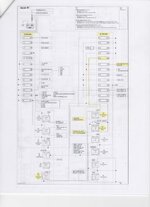
I'm going to try uploading a file with my RT's main wiring diagram. I can't imagine your bike is much different. I tried uploading a pdf file, but it's too large. If you want me to send you that instead, then DM me with your email address.
Spyder RT wiring diagram.jpg
Maybe someone on this forum has the diagram for your bike, but until then maybe this will help.
 
Wheelman. So, you have no power to either fuse box? There's nothing between the fuse boxes and the battery, except for a big, fat, red wire. You should have power to the upstream side of the J-Case fuses even with the key off. This is not a DESS problem. Humor me. Put your voltmeter across the battery terminals, and positive terminal to frame ground, and check voltage. Let's just see if maybe the BMS system has put that battery to sleep for some, as yet, unknown reason.
 
Last edited:
Wheelman. So, you have no power to either fuse box? There's nothing between the fuse boxes and the battery, except for a big, fat, red wire. You should have power to the upstream side of the J-Case fuses even with the key off. This is not a DESS problem. Humor me. Put your voltmeter across the battery terminals and check voltage. Let's just see if maybe the BMS system has put that battery to sleep for some, as yet, unknown reason.
I agree. It does not seem like a DESS issue, but rather a simple wiring issue. I think you're right to suspect the main battery wiring. That's where the focus should be at this point.
 
Back
Top