• There were many reasons for the change of the site software, the biggest was security. The age of the old software also meant no server updates for certain programs. There are many benefits to the new software, one of the biggest is the mobile functionality. Ill fix up some stuff in the coming days, we'll also try to get some of the old addons back or the data imported back into the site like the garage. To create a thread or to reply with a post is basically the same as it was in the prior software. The default style of the site is light colored, but i temporarily added a darker colored style, to change you can find a link at the bottom of the site.

Android Auto (wireless) for 2024 and up Spyders now available and working

jcthorne

Well-known member
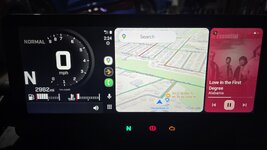
Android Auto on Spyder Display.jpg

First Amazon links to the 3 products required to install.

Binize CarPlay AI Box - Only buy this particular one, direct from Binize. It will have the updated software that works with the CanAm Spyders already installed https://www.amazon.com/dp/B0C2L5G1FK

Motorcycle SAE to USB power supply - https://www.amazon.com/dp/B0DB5S6W9W

Motorcycle SAE charging leads - https://www.amazon.com/PACK-Sae-Ring-Terminal-Harness/dp/B09GFTBJ3F

You will have to have a Bluetooth headset already paired to your bike and powered on for this to work just as for CarPlay without this box. A microphone and speakers are required and the headset is how this bike get those connected to CarPlay and now Android Auto.

Installation is simple. The Binize AI Box comes with a T-shape USB cable that will connect to your bike and the box. The extra lead goes to the USB power supply that will power the box BEFORE the instrument cluster powers up and looks for a CarPlay connection.

Plug it all in, boot up the instrument cluster and the setup screen will come up instead of CarPlay. The cluster and box may need to reboot a couple of cycles to auto determine and format the image to fit the Can Am screen. Once you have the Android system up and running, launch the Autokit app to start Android Auto and pair your phone to the Binize box. Once you have it connected, you can go into settings on the Binize box to auto launch Autokit each time your bike connects. This will have the system come up in Android Auto every time you turn on the bike. Wirelessly. No need to plug in your phone!

Next, if you are a CarPlay user, this box can connect wirelessly to an iPhone as well giving you wireless CarPlay.

Lastly, the Binize box can function without a phone connection at all if you install a sim card in it for wireless connectivity and the apps, including unrestricted full video, run directly on the box. I had no need for this while riding so did not explore that system much.

I have had this system on my F3 for a couple weeks now and several rides and the it has worked perfectly. Starts up and launches each and every time the bike is turned on. Even remembers what I was listening to (I use an app called PlexAmp to use my large music library at home and on my phone). Google Assistant works great through the headset. I have searched for locations and navigated there using voice command as well as asking for weather and news.

I think this is sufficient information to get folks thoroughly confused so I will stop here but feel free to ask questions. I am not selling anything here, I do not have a business relationship with Binize other than I purchased the product (adaptor box number 23 that I tried) and worked with their development staff to squash a few bugs and get this working smoothly. ENJOY!
 
Last edited:
Thanks for the great write up, and all your work on this. I do have a couple of questions.

1. It looks like the box is powered by USB, so any "high power" USB port (USB 3 or higher) should work, correct? I ask in case I want to add some USB ports anyway and wanted to try a different cable that you mention.​
2. From the way you have wired, and some wording in your post, that box needs to be fully powered before you turn the key on the bike, so wired directly to the battery. Any idea how how much battery drain the box has when just sitting idle? Guess is not a lot, but just in case...​
3. Any approx idea on how fast the box boots if you did not have wired to be powered on all the time? Guessing the bike boots quicker than the box, but sometimes these boxes are as quick or faster than car/bike systems.​
4. What do you think of the useability of AA on the bike? I have a Carpuride now with a 7 inch screen, but am intrigued by the built in solution. Is the visibility good, touch buttons work well, etc. I had been looking at the newest Carpuride that has built in GPS and can install apps, but now I am debating this approach.​

Thanks for all your work.

NOTE: I was just looking at the Amazon add, it says it is NOT compatible with Samsung phones. Oh well...
 
Last edited:
Thanks for the great write up, and all your work on this. I do have a couple of questions.

1. It looks like the box is powered by USB, so any "high power" USB port (USB 3 or higher) should work, correct? I ask in case I want to add some USB ports anyway and wanted to try a different cable that you mention.​
2. From the way you have wired, and some wording in your post, that box needs to be fully powered before you turn the key on the bike, so wired directly to the battery. Any idea how how much battery drain the box has when just sitting idle? Guess is not a lot, but just in case...​
3. Any approx idea on how fast the box boots if you did not have wired to be powered on all the time? Guessing the bike boots quicker than the box, but sometimes these boxes are as quick or faster than car/bike systems.​
4. What do you think of the useability of AA on the bike? I have a Carpuride now with a 7 inch screen, but am intrigued by the built in solution. Is the visibility good, touch buttons work well, etc. I had been looking at the newest Carpuride that has built in GPS and can install apps, but now I am debating this approach.​

Thanks for all your work.

NOTE: I was just looking at the Amazon add, it says it is NOT compatible with Samsung phones. Oh well...
Yes, any usb power source will work as long as its powered BEFORE the instrument cluster is booted up. IE if it powers up with the key, this solution will not connect as the the Binize box will not have time to boot up and respond to the cluster handshake when asked. It just does not boot up fast enough and the bike never attempts handshake again nor is there a way to initiate it other than plugging in the device.

I measured the idle draw of the box at approx 100ma. Not too bad but could draw down a Spyder battery over a week or two. Overnight is not an issue as I have done that multiple times. I unplug the USB adaptor when I plug my battery maintainer in when parking my bike. Using the same lead for both means I cannot forget it.

I have no idea why they say its not compatible with a Samsung phone. I did all my testing with a Samsung Fold 5 and even the developer never mentioned it. Samsung phones on the current Android release work fine with the adaptor and android auto.

As far as usability, I have found one downfall. The bike disables the touch screen while you are moving. You can only navigate the interface using the buttons on the control cluster while moving. And BRP did not include a 4 way toggle. Only up, down, OK and Back. Voice commands always work. And work well.

Lastly, because of the limitations of Google Maps on mobile devices, it still cannot replace my Garmin navigator. Has nothing to do with this device, its a google development issue. Routes are just not yet supported on mobile for navigation, only in the cloud on a browser.
 
Be advised that forum admins edited my original post and mucked up the links to the devices needed to purchase. Sending folks to all sorts of fubar ebay locations. I fixed them.
 
Last edited by a moderator:
jcthorne, please use the report a post at the bottom of each post if you find a problem with a post. I apologize for the mistake that someone made with one of the 3 links. By reporting a post, the staff could have and would have reviewed the post quickly, noted the error, and fixed it.
 
Last edited:
Lastly, because of the limitations of Google Maps on mobile devices, it still cannot replace my Garmin navigator. Has nothing to do with this device, its a google development issue. Routes are just not yet supported on mobile for navigation, only in the cloud on a browser.
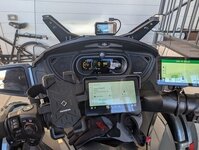
Could you expand of this. I have a Garmin Zumo XT, a Pixel 8 Pro android phone, and YZW MT600 carplay/android auto display. I tend to create routes on desk top and send the to the Pixel 8 PRO. That route comes up on the android auto screen on the YZW MT600. I play my music most of the time from the Garmin GPS and then bring up the maps screen as it shows speed limits and notifies of changes in speed limits.

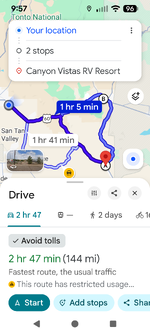
I can create a google maps route on the Pixel 8 PRO, however it is much easier on the desk top. I just created this route on the Pixel phone. I can also save it to a home screen on the phone, for use later.
Screenshot_20260209-095721.png - PXL_20251204_172525309 (1).jpg
 
Last edited:
Could you expand of this. I have a Garmin Zumo XT, a Pixel 8 Pro android phone, and YZW MT600 carplay/android auto display. I tend to create routes on desk top and send the to the Pixel 8 PRO. That route comes up on the android auto screen on the YZW MT600. I play my music most of the time from the Garmin GPS and then bring up the maps screen as it shows speed limits and notifies of changes in speed limits.

I can create a google maps route on the Pixel 8 PRO, however it is much easier on the desk top. I just created this route on the Pixel phone. I can also save it to a home screen on the phone, for use later.
View attachment 253460 - View attachment 253462
Create a route on google maps on the desktop. Once it has the route plotted, edit the roads used to your liking. Now send the route to your phone. The transferred route only brings the destinations across, not the route so your edits and the roads you selected are gone.

Transferring to a mobile device only sends destinations. Not the route information. Up until early last year, it only sent the first destination, now at least it sends all of them (8 max) but still no routing information.
 
Create a route on google maps on the desktop. Once it has the route plotted, edit the roads used to your liking. Now send the route to your phone. The transferred route only brings the destinations across, not the route so your edits and the roads you selected are gone.

Transferring to a mobile device only sends destinations. Not the route information. Up until early last year, it only sent the first destination, now at least it sends all of them (8 max) but still no routing information.
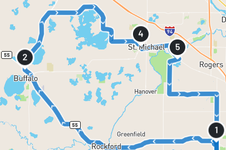
Just created the same route on the desktop going the other direction. Sent it to the phone. Maybe you have a older version of google maps? Maybe google pixel phones have things that other brands do not.?

Screenshot_20260209-113634[1].png
 
Yes, any usb power source will work as long as its powered BEFORE the instrument cluster is booted up. IE if it powers up with the key, this solution will not connect as the the Binize box will not have time to boot up and respond to the cluster handshake when asked. It just does not boot up fast enough and the bike never attempts handshake again nor is there a way to initiate it other than plugging in the device.

I measured the idle draw of the box at approx 100ma. Not too bad but could draw down a Spyder battery over a week or two. Overnight is not an issue as I have done that multiple times. I unplug the USB adaptor when I plug my battery maintainer in when parking my bike. Using the same lead for both means I cannot forget it.

I have no idea why they say its not compatible with a Samsung phone. I did all my testing with a Samsung Fold 5 and even the developer never mentioned it. Samsung phones on the current Android release work fine with the adaptor and android auto.

As far as usability, I have found one downfall. The bike disables the touch screen while you are moving. You can only navigate the interface using the buttons on the control cluster while moving. And BRP did not include a 4 way toggle. Only up, down, OK and Back. Voice commands always work. And work well.

Lastly, because of the limitations of Google Maps on mobile devices, it still cannot replace my Garmin navigator. Has nothing to do with this device, its a google development issue. Routes are just not yet supported on mobile for navigation, only in the cloud on a browser.
Thanks, excellent info. I am considering hard wiring, so if I do so, I will work an on/off switch to the equation so I can power down if needed. May even try it in the trunk, but think the USB cable length might cause timing issues.

Great info on the Samsung. Some older phones struggle with AA devices, so may just be their disclaimer in case. I am running an S24 with current OS, so likely would not have issues.

For navigation, there is a way to get small routes from Maps over, but it did not work great for me. I don't recall specifics, there is a setting or specific format you must use. I moved to the MyRoute application and so far am very happy with it based on limited use. It is a pay app for full functions, but caught it on sale and was pretty cheap. The desktop route planner is very flexible, and then the route automatically is on your app. Creates GPX and other formats as well... much friendly than Basecamp was for me. They do have a free trail if you ever want to take a look.

Thanks
 
I am giving My Route Online a try but cannot figure out how to manipulate the route to use the roads I want. Does not seem to allow drag n drop or other editing of the route. I am trying to recreate a known route we recently used and see how it transfers to Google Maps in android.
 
I am giving My Route Online a try but cannot figure out how to manipulate the route to use the roads I want. Does not seem to allow drag n drop or other editing of the route. I am trying to recreate a known route we recently used and see how it transfers to Google Maps in android.
As I noted in the emails, drag n drop in google maps does not create a way point. What you need to do is create more actual way points.
 
I am giving My Route Online a try but cannot figure out how to manipulate the route to use the roads I want. Does not seem to allow drag n drop or other editing of the route. I am trying to recreate a known route we recently used and see how it transfers to Google Maps in android.
I use one of two ways.

1. Use Routelab (selection on screen), Create a scenic route via adding a start and end point. Then tell it to generate a route. Will likely come back with a couple of options. Pick the one you want. You will see the route on the map, and towards the top right "Edit route-track". Hit that. System will convert to a series of bubbles which I believe are shaping points. You can then either drag and drop those, delete them, and click anywhere on the map to add a new point.
2. Alternately, and may be easier for short routes, Do a new route, enter a start point at the top left search bar. It will show that location on a map. On the very left, you will then have a list of waypoints. Now search for a new point and add it, or you can click/drag a point on the map. Waypoints in the listing can be reordered etc just like Google.

Note there are multiple map options, including HERE/Garmin. Does Tom Tom as well as others. Very compatible

Hope above kind of makes sense. The disadvantage of approach 1 is you get a lot of points you have to drag or delete. 2 is more like google maps etc.

EDIT 2: Just looked at mine, and you may not have the map versions (Here/Garmin etc) that allow you full flexibility. Looks like it may now be part of the purchased package I have. That might be limiting you, I bought mine last year and they allowed you do create routes etc free, even use the App to navigate on phone with some limits like no AA. Seems they are clamping down. At min, thought they had a trail period though.
 
Last edited:
As I noted in the emails, drag n drop in google maps does not create a way point. What you need to do is create more actual way points.
No, drag n drop creates shaping point. Adding waypoints does not work either. First, you are limited to 10 including start and end points. next it creates a new route between each 2 points so it does not navigate through to the actual destination, just to the first waypoint then you have to start a new route.

As I said, routes do not yet work in Google Maps for mobile devices.
 
I use one of two ways.

1. Use Routelab (selection on screen), Create a scenic route via adding a start and end point. Then tell it to generate a route. Will likely come back with a couple of options. Pick the one you want. You will see the route on the map, and towards the top right "Edit route-track". Hit that. System will convert to a series of bubbles which I believe are shaping points. You can then either drag and drop those, delete them, and click anywhere on the map to add a new point.
2. Alternately, and may be easier for short routes, Do a new route, enter a start point at the top left search bar. It will show that location on a map. On the very left, you will then have a list of waypoints. Now search for a new point and add it, or you can click/drag a point on the map. Waypoints in the listing can be reordered etc just like Google.

Note there are multiple map options, including HERE/Garmin. Does Tom Tom as well as others. Very compatible

Hope above kind of makes sense. The disadvantage of approach 1 is you get a lot of points you have to drag or delete. 2 is more like google maps etc.

EDIT 2: Just looked at mine, and you may not have the map versions (Here/Garmin etc) that allow you full flexibility. Looks like it may now be part of the purchased package I have. That might be limiting you, I bought mine last year and they allowed you do create routes etc free, even use the App to navigate on phone with some limits like no AA. Seems they are clamping down. At min, thought they had a trail period though.
So once you create the route, does it send it to Google Maps on your phone? IE how do you use the route while on the bike? Sorry for so many questions but the web site really gives very little information on how it works or what it can do. Just selling subscriptions.
 
So once you create the route, does it send it to Google Maps on your phone? IE how do you use the route while on the bike? Sorry for so many questions but the web site really gives very little information on how it works or what it can do. Just selling subscriptions.
You can save the route in a variety of formats including multiple GPX, KML, even Harley Boom format. When I use maps, I then email the GPX file to myself (using the "save" then "Email route" option), and just open it from the email (which opens maps on my phone). You do have limits of the phone map application though, likes to reroute, think it is 10 waypoints etc. File can also be imported to Garmin devices as well.

I am actually using the MyRoute App on my Galaxy though. It logs into my account, and my routes are sitting there. In the app you can create and modify routes etc as well, but with limits of a phone. The app is AA and Carplay compatible, and so far has worked very well for me.

If you do save a route, you have to elect formats. There are 4 GPXs of different versions. Some Garmins will only use old versions, so you have to be careful, but the newer versions of GPX allow custom point naming etc. Don't recall all the specifics of the differences in GPX formats, but they true to be extremely flexible so they operate with anyone
 
You can save the route in a variety of formats including multiple GPX, KML, even Harley Boom format. When I use maps, I then email the GPX file to myself (using the "save" then "Email route" option), and just open it from the email (which opens maps on my phone). You do have limits of the phone map application though, likes to reroute, think it is 10 waypoints etc. File can also be imported to Garmin devices as well.

I am actually using the MyRoute App on my Galaxy though. It logs into my account, and my routes are sitting there. In the app you can create and modify routes etc as well, but with limits of a phone. The app is AA and Carplay compatible, and so far has worked very well for me.

If you do save a route, you have to elect formats. There are 4 GPXs of different versions. Some Garmins will only use old versions, so you have to be careful, but the newer versions of GPX allow custom point naming etc. Don't recall all the specifics of the differences in GPX formats, but they true to be extremely flexible so they operate with anyone
Thanks, think I understand better. The routes run in a new navigation app on the phone, not Google Maps. Makes sense. I need to give it a try. I will sign up for a trial account and play with it a bit.
 
If you're using a paid subscription/app to bypass Google maps limitations, Rever lets you create routes with waypoints (online or in their phone app) that you can then follow on your phone using their app. And you can export GPX files. Just putting that out there as another option. Free account limits you to 10 waypoints I think.
1770677233253.png
 
Back
Top