• There were many reasons for the change of the site software, the biggest was security. The age of the old software also meant no server updates for certain programs. There are many benefits to the new software, one of the biggest is the mobile functionality. Ill fix up some stuff in the coming days, we'll also try to get some of the old addons back or the data imported back into the site like the garage. To create a thread or to reply with a post is basically the same as it was in the prior software. The default style of the site is light colored, but i temporarily added a darker colored style, to change you can find a link at the bottom of the site.

No Apple Car Play when updated BRP Go

rbolt809

New member
Updated my 2026 S2S today with BRP Go nav. Now there's no Apple Car Play ....not even the Icon :( It was replaced by the BRP Go nav icon.
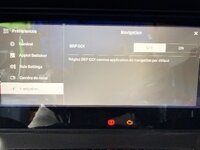
 
Updated my 2026 S2S today with BRP Go nav. Now there's no Apple Car Play ....not even the Icon :( It was replaced by the BRP Go nav icon.
Go into your preferences and scroll down to the navigation options.
Once there you will see a "on-off" toggle to activate or remove the BRP GO navigation as the default navigation option which will restore the Apple CarPlay icon on the main page after a screen reboot.

IMG_9449.jpeg
 
Thanks Slypx ! I was just playing around with it a couple of hours and discovered this . Was logging on to update . It was nice that you didn't have to turn off and on for it to reboot ......less then a minute
 
Back
Top