• There were many reasons for the change of the site software, the biggest was security. The age of the old software also meant no server updates for certain programs. There are many benefits to the new software, one of the biggest is the mobile functionality. Ill fix up some stuff in the coming days, we'll also try to get some of the old addons back or the data imported back into the site like the garage. To create a thread or to reply with a post is basically the same as it was in the prior software. The default style of the site is light colored, but i temporarily added a darker colored style, to change you can find a link at the bottom of the site.

How do I go to a higher speed on Cruise control?

Mike0123

Member
Hi all. Have a question that I can’t find a direct answer to. While out on our '21 RTL with cruise engaged at 40 (for example), I throttle up to 50 and I want to set the cruise at this new speed. I’ve tried pushing down, and that doesn’t seem to work (it falls back to the previously set speed), up just increases the set speed 1 mph since it’s already engaged, BUT sometimes, something I’m doing works. Sometimes the cruise will stay at the new speed.

So, am I just pushing up enough times to raise the setting, or is there some combination of pushes that is resetting the cruise to the new speed? The only reliable thing I can do every time is switch it off then on, then set the new speed.

Anyway, as they say… first world problems.

Thanks
 
Push up and HOLD until the new speed takes. Push up and let go moves it up in 1KPH increments, down drops it by 1KPH per push. You get a sense of the time to hold it up to set the new speed, occasionally I'll over shoot and have to knock it back a couple. Least that's how mine works.
 
Push up and HOLD until the new speed takes. Push up and let go moves it up in 1KPH increments, down drops it by 1KPH per push. You get a sense of the time to hold it up to set the new speed, occasionally I'll over shoot and have to knock it back a couple. Least that's how mine works.
Yeah I forgot to mention I did know about that, but I was hoping for a quick twiddle that simply set it again to where you are. I’m sure you have the answer. Thank you.
 
Yeah I forgot to mention I did know about that, but I was hoping for a quick twiddle that simply set it again to where you are. I’m sure you have the answer. Thank you.
Tap the brake pedal or shift gears, then you can set it to a new speed by pushing down and resume the previous speed by pushing up. Or switch CC off and back on.
 
Tap the brake pedal or shift gears, then you can set it to a new speed by pushing down and resume the previous speed by pushing up. Or switch CC off and back on.
This is what prompted my question. I may simply need to pay more attention, but it seems when I downshift, or tap the brakes, then accelerate to a higher speed, pushing down seems to just “turn on” the previous, lower, setpoint.

It’s certainly not a big deal, but it did prompt that question.
 
This is what prompted my question. I may simply need to pay more attention, but it seems when I downshift, or tap the brakes, then accelerate to a higher speed, pushing down seems to just “turn on” the previous, lower, setpoint.

It’s certainly not a big deal, but it did prompt that question.
I wonder if they reversed how resume/set works on 2020+ trikes.
 
I just went out and checked mine and it is indeed labeled as @Snoking1127 described it working, but I swear it doesn't work that way... but you have me doubting my self now. I'm going to have to go for a ride to check.

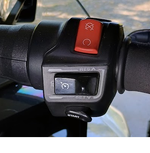
cruise.png
 
This is what prompted my question. I may simply need to pay more attention, but it seems when I downshift, or tap the brakes, then accelerate to a higher speed, pushing down seems to just “turn on” the previous, lower, setpoint.

It’s certainly not a big deal, but it did prompt that question
On my '22 to resume I hold the button "up" to increase speed I either hold the button "up" until I reach the higher speed or hold it "up" several times for a single mph of kph increase.
 
Ok, went out today, I must have been in a daze previously lol.

When you're at the desired cruising speed, push the button down and release to set that speed as your cruise speed.

If you want to increase your speed either hold the button up and it'll speed up and release when you reach your desired speed, bump it up and it'll go up a bit over 1km per hour or 1 MPH for each bump or else use the throttle to speed up and hit the button down once to set new faster cruise speed.

For slowing down, either hold the button down till you reach your desired speed, bump it down and it'll drop the kph or mph by one for each bump, hit the brake or shift which will disengage the cruise and re enable it when you reach your speed. I find the slow down quite drastic when disengaging the cruise so I'll give it throttle when I disengage it to make sure it's throttle position corresponds with the current bike speed.
 
Back
Top