• There were many reasons for the change of the site software, the biggest was security. The age of the old software also meant no server updates for certain programs. There are many benefits to the new software, one of the biggest is the mobile functionality. Ill fix up some stuff in the coming days, we'll also try to get some of the old addons back or the data imported back into the site like the garage. To create a thread or to reply with a post is basically the same as it was in the prior software. The default style of the site is light colored, but i temporarily added a darker colored style, to change you can find a link at the bottom of the site.

2025 Spyder Sea 2 Sky - Where is the Dedicated GPS Power Plug-in?

pvosbury49

New member
I am in the process of buying a new (leftover) 2025 Spyder Sea 2 Sky Can Am. I lead a lot of rides for my group so I need a versatile and reliable GPS, and I don't want it to be dependent on my phone. I plan on buying a Garmin Zumo XT3 and mounting it in the center of the handlebars using a Lamonster mount. I have had many Garmin GPS units in the past and I am very familiar with creating rides using Garmin Basecamp.

Can anyone tell me where the dedicated GPS power plugin is located on the 2025 model of the Spyder S2S, and how difficult it is to gain access to it? I understand it has moved to different locations on different year models. Does anyone know if a video has been created showing what has to be removed to gain access to the plug-in?

Thanks in advance for any insight that can be provided.
 
I just bought an XT3, you use Tracker app now for that. Don't know if Basecamp would work on that, or probably much better functionality by using the newer Tracker app
 
I grabbed an Acrobat PDF copy of the 2025 Spyder RT Operator's Guide from this site:


On Page 34 it confirms that there is a USB port in the "glove box" in front of the handlebars, same as on my 2024 Spyder RT Sea2Sky.

I used a Garmin Zumo XT plugged into that port for power on my 2024 Spyder RT S2S before CAN-AM got the Apple CarPlay to work correctly.

Now that Apple CarPlay is working, that USB port is what I connect my iPhone too so that I have navigation on the Spyder's display.
 
Hopefully the plug you are looking for is still on the right side under a panel. There were some good videos of it on the Lamonster website.
 
Hopefully the plug you are looking for is still on the right side under a panel. There were some good videos of it on the Lamonster website.
This is an interesting question, whether the 2025 or 2026 has the accessory power port on the right side.
I have this docking station installed on my 2024 Spyder RT Sea2Sky:


It does connect to the accessory power port on the right front side of my Spyder.
You can see from the name that it says it fits Spyder RT 2020+, and on the webpage it shows 2020 thru 2026 Spyder RT/RT-L.
There's also a link to download the Installation Instructions, which show to remove the various panels to get to the power port.


Or just plug into the USB cable in the glove box.
 
I have a 2026 Sea to Sky. I bought a USB-A to USB-C adaptor and plugged that into the USB-A dongle in the glove box. I lifted the glove box out of the fairing, it's not fastened in place, it just sits there, and removed the little rubber bung in to bottom of it.

Then I fed a USB-C 3 foot cable under the handlebars and into the space where the glove box was. I reached down into the space where the glove box was and fished the cable out, passed it through where the rubber bung was and attached it to the USB-A to USB-C adapter.

The other end of the USB-C cable, which I had bought with a 90 degree connector goes to my phone or any other USB-C device.

I also bought a rubber seal item that attaches to the USB-C cable and covers the exposed USB-C connector to keep the moisture out when not in use.

The glove box just slots back into place.

This way I don't have to run a USB cable out under the glove box lid.

The USB-C cable I bought is plastic, not a woven finish, as I thought it would be more weather proof.

I got everything off Amazon.

JOMIHONEY Right Angle USB A Male to USB C Female Adapter, 90 Degree USB 3.0 to Type C Cable Connector Support Unidirectional Sides 10Gbps & Data Transfer, for Laptops/Phone/Tablet/PC


[5-Piece] Cozy USB Caps for USB C Cable - Tether/Cap Provides Dust and Oxidation Protection, Projection Adapter Cover, Protects During Travel, Portable, Designed by Cozy (Black)


Cable Matters 20Gbps Right Angle USB C Cable - 3ft, Supports Up to [8K@30Hz / 4K@120Hz Video, 240W Charging, 20Gbps Data Transfer] 90 Degree USB C Cable, Right-Angle USBC to USBC Cord
 
I have a 2026 Sea to Sky. I bought a USB-A to USB-C adaptor and plugged that into the USB-A dongle in the glove box. I lifted the glove box out of the fairing, it's not fastened in place, it just sits there, and removed the little rubber bung in to bottom of it.

Then I fed a USB-C 3 foot cable under the handlebars and into the space where the glove box was. I reached down into the space where the glove box was and fished the cable out, passed it through where the rubber bung was and attached it to the USB-A to USB-C adapter.

The other end of the USB-C cable, which I had bought with a 90 degree connector goes to my phone or any other USB-C device.

I also bought a rubber seal item that attaches to the USB-C cable and covers the exposed USB-C connector to keep the moisture out when not in use.

The glove box just slots back into place.

This way I don't have to run a USB cable out under the glove box lid.

The USB-C cable I bought is plastic, not a woven finish, as I thought it would be more weather proof.

I got everything off Amazon.

JOMIHONEY Right Angle USB A Male to USB C Female Adapter, 90 Degree USB 3.0 to Type C Cable Connector Support Unidirectional Sides 10Gbps & Data Transfer, for Laptops/Phone/Tablet/PC


[5-Piece] Cozy USB Caps for USB C Cable - Tether/Cap Provides Dust and Oxidation Protection, Projection Adapter Cover, Protects During Travel, Portable, Designed by Cozy (Black)


Cable Matters 20Gbps Right Angle USB C Cable - 3ft, Supports Up to [8K@30Hz / 4K@120Hz Video, 240W Charging, 20Gbps Data Transfer] 90 Degree USB C Cable, Right-Angle USBC to USBC Cord
Do you get 3.0 using the glove box dongle?
 
Do you get 3.0 using the glove box dongle?
No I don't think so. It seems to be USB 2.0 and is used for power and data transfer for the apps on the phone interfacing to the display. From the devices I have connected it seems to provide 5.0 volts about 1.5 amps of power, tops. USB 2.0 at 1.5 amps is sometimes call USB 2.1. The power is supplied from a 12.0 volt feed but your USB connector will pull that down to 5.0 volts.

From what I can tell the Bluetooth connection is for audio and cell phone voice connections as well as helmet headset connections. I suspect the realistic data rate maximum is liable to be around 1.5Mb/s which is more than enough for even apple's AAC music transmission.

The USB in the rear trunk if for USB power only. It might give you a bit more than 1.5 amps, say 2.5 amps but I doubt if it is a high power charging port. It has no data path.

So I think the front port is going to give you the 480 Mb/s, in theory. In reality typically such USB-A ports likely give about 1/10th of that in reality, say 50Mb/s) which is way more than Apple CarPlay actually needs when the audio and helmet inter-communications data comes over the Bluetooth path instead.

No upgrading of the cable to a USB-C connector from the display circuit board is likely to give you USB 3.0 or higher. The data rate for both USB and Bluetooth is defined by the chip set on the display circuit board and most current systems on motorcycles give you anything over USB 2.0 data rates. For the phone USB and Bluetooth connections to use Apple's CarPlay these data rates are more than adequate and provide better reliability than higher data rates provided by USB 3.0 and Bluetooth 4 or 5 connections.

Considering the hardware and software has to support USB (data and video), Bluetooth (audio and communications), WiFi Ethernet (system over the air updates) and CanBus (automotive system control) systems probably from some automotive System on a Chip (SoC) device, I suspect it is not up to the specification that some larger, higher power consuming devices that are found in automobiles, can provide.

I have not seen any pictures of the display circuit boards on line so I might be wrong, but I suspect I am not from my experience on my 2026 Sea to Sky.
 
No I don't think so. It seems to be USB 2.0 and is used for power and data transfer for the apps on the phone interfacing to the display. From the devices I have connected it seems to provide 5.0 volts about 1.5 amps of power, tops. USB 2.0 at 1.5 amps is sometimes call USB 2.1. The power is supplied from a 12.0 volt feed but your USB connector will pull that down to 5.0 volts.

From what I can tell the Bluetooth connection is for audio and cell phone voice connections as well as helmet headset connections. I suspect the realistic data rate maximum is liable to be around 1.5Mb/s which is more than enough for even apple's AAC music transmission.

The USB in the rear trunk if for USB power only. It might give you a bit more than 1.5 amps, say 2.5 amps but I doubt if it is a high power charging port. It has no data path.

So I think the front port is going to give you the 480 Mb/s, in theory. In reality typically such USB-A ports likely give about 1/10th of that in reality, say 50Mb/s) which is way more than Apple CarPlay actually needs when the audio and helmet inter-communications data comes over the Bluetooth path instead.

No upgrading of the cable to a USB-C connector from the display circuit board is likely to give you USB 3.0 or higher. The data rate for both USB and Bluetooth is defined by the chip set on the display circuit board and most current systems on motorcycles give you anything over USB 2.0 data rates. For the phone USB and Bluetooth connections to use Apple's CarPlay these data rates are more than adequate and provide better reliability than higher data rates provided by USB 3.0 and Bluetooth 4 or 5 connections.

Considering the hardware and software has to support USB (data and video), Bluetooth (audio and communications), WiFi Ethernet (system over the air updates) and CanBus (automotive system control) systems probably from some automotive System on a Chip (SoC) device, I suspect it is not up to the specification that some larger, higher power consuming devices that are found in automobiles, can provide.

I have not seen any pictures of the display circuit boards on line so I might be wrong, but I suspect I am not from my experience on my 2026 Sea to Sky.
Thanks that was a great answer.
 
I am about a bit confused about this conversation.

There seems to be a focus on the data transfer rates, when there isn't a whole lot of data transfer happening.
Yes, it transfer the navigation information, but it's just the location information.
 
Well the Bluetooth data rates have to be fast enough to support Apple AAC lossless audio and helmet to bike and bike to helmet communications over the Bluetooth connection.

The USB 2.0 wired interface has to be sufficient to carry the Apple protocol it uses to update the display from phone and carry data as necessary between the display and the phone as well phone and the display due the touch interface.

The communication over the USB link is complicated. It is not raw screen data from the iPhone to the display as would happen if it were some HDMI or USB monitor. Neither does the display run any of the apps run on the display, they just appear to, they are still actually running on the iPhone.

Instead there is a complex protocol that allows the iPhone apps to have their display images to be drawn on the display from the iPhone as if they were running on the display. This is a kind of illusion as the apps are still revert much running on the phone.

Likewise the display allows screen touch information to be sent to the iPhone to appear like these events happened on the phone. For touch events data rates are not necessarily high but latency must be low.

Although music is carried over the Bluetooth channel meta data and control information still follows the USB path.

The protocol between the phone and the display is Apple’s iAP2 protocol. This is neither a raw display projection nor remote execution of the iPhone’s applications. It’s a secure, low latency, data protocol for rendering the displays for phone based applications. Hence it might not require the bandwidth of a remote display but it still has non trivial data throughput and low latency capabilities. USB 2.0 seems capable of supporting the requirements.

I imagine BRP required a USB cable for iAP2 protocol support instead of peer to peer WiFi because on the improved reliability of the connection as well as ensuring the phone was receiving power whilst running in such a manner.
 
Okay,
Well the Bluetooth data rates have to be fast enough to support Apple AAC lossless audio and helmet to bike and bike to helmet communications over the Bluetooth connection.

The USB 2.0 wired interface has to be sufficient to carry the Apple protocol it uses to update the display from phone and carry data as necessary between the display and the phone as well phone and the display due the touch interface.
Two different things there.

1) bluetooth connection speeds for audio. CAN-AM has not specified which version of Bluetooth they support on my 2024 Spyder RT and I don't see a version listed in the 2025 Spyder RT Operator's Guide, either. My SENA 3S Plus headset supports Bluetooth 5.1 and connects just fine to my Spyder. I don't play music while riding, but have no problem hearing the Apple CarPlay directions.

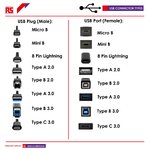
2) USB connection speeds. According to the information for Apple CarPlay, it requires a cable that supports data transfer with a minimum speed of 480 Mbps, which is USB 2.0. Using a "faster" cable will work, it just doesn't provide any benefit. And I went and checked the connector in the glovebox of my 2024 Spyder RT and it's a USB Type A 2.0 connector. How do I know which version it is, since the Operators Guide doesn't have that information?
From the color of the connector. USB 3.0 connectors are blue inside:

usbconnectors.jpeg
 
Last edited:
Yes, newer versions of Bluetooth will establish connections with systems that support earlier versions of Bluetooth but will obviously only support the earlier specification bandwidth performance. I have some old tiny desktop PC's with ancient Bluetooth adapters and I can connect even Bluetooth 5.1 client devices to them.

My Sena SRL2 system in mine and my wife's Shoei helmets are probably Bluetooth 4.1 and they work fine too, though I don't actually pair them with the Spyder. I pair the helmets with each other, and the rider's helmet to my iPhone, and then the iPhone is in turn paired to the bike. If I don't do that the Spyder and the helmet to helmet sound levels step on each other and I can neither hear my wife or the Spyder output.

I don't use the Spyder as the helmet to helmet hub. This problem is overcome by the newer Sena SRL-Mesh units, but I'm not going to upgrade to anything else until we buy new helmets next year when our helmets hit their five year expiry date. At about $1,000 per helmet, plus $300 for the communications unit, per helmet, that's a next year investment.

The USB connector is a type A. From what I can determine through connection to my iPhone it is a USB 2.0 connection even if I use a 3.0 specification cable. It however it does supply a little higher amperage than USB 2.0, enough to be what some folks call a USB 2.1 connection. I used a USB-A to USB-C right angled adapter, and then a USB-C cable to go to my phone down through the bottom of the glove box and then up through to the handlebars. I did this as I had a 3 foot USB-C to USB-C plastic covered cable spare and I wanted to keep the adapter in the dry rather than at the iPhone end of the cable on the handlebar mount.

Although the data rate for USB 2.0 is specified at 480 Mb/s, most of the USB 2.0 chip sets in System on a Chip automotive designs used by all but the most modern in-car systems rarely get anywhere near this bandwidth. Most devices are lucky to get more than about 50 Mb/s in reality, mostly because the data they are communicating backwards and forwards over the USB connection doesn't require even that level of bandwidth. Why not use USB 3.X would be an obvious question? Well, the USB 2.0 connection has far more bandwidth than is needed to keep even moving maps updated. USB 2.0 devices are cheaper in the embedded world, often as part of the CPU chip itself. USB 3.X is far more prone to EMI and subsequent data corruption which in the motorcycle world is a factor with the lack of metal shielding from the ignition circuitry.

I've not got any reliable way to check the average data rate without knowing exactly which device the head unit uses, but from experience of other automotive and embedded systems I doubt that the USB channel is any faster than at most about 1/10th of the theoretical instantaneous bit rate at most. None of the Apple CarPlay apps need anywhere close to requiring 480 Mb/s data rate using the Apple remote display protocol. No matter what the USB specification states that any version of USB is theoretically capable of, in reality many cheap embedded devices won't transmit an average data rate that comes anywhere close to scaling up the instantaneous bit rate. In any case latency is the issue in reality for CarPlay type systems, not bandwidth.

Now, computer systems such as Macs and PCs tend to deliver closer to the appropriate theoretical USB bandwidth because they are designed for data transfer to and from solid state disk type devices, but cheap System on a Chip embedded processors often don't implement very high data rates. The data rate may be further regulated by the device driver and protocol stack that the operating system on the head unit manages to drive the data at.
 
Back
Top