
• There were many reasons for the change of the site software, the biggest was security. The age of the old software also meant no server updates for certain programs. There are many benefits to the new software, one of the biggest is the mobile functionality. Ill fix up some stuff in the coming days, we'll also try to get some of the old addons back or the data imported back into the site like the garage. To create a thread or to reply with a post is basically the same as it was in the prior software. The default style of the site is light colored, but i temporarily added a darker colored style, to change you can find a link at the bottom of the site.

2018 RTL GPS/Accessory 12 VDC Keyed circuit

h0gr1der

New member
After burrowing through many threads after this info, I got a mix of folks saying left side midway down the seat, some said right side. The drawing shows the GPS2 connection as the end of the rear harness, right side. After finishing my GPS install, I thought I'd post a pic showing the connector.2018 RTL GPS_Accy 12 VDC Connection.jpg
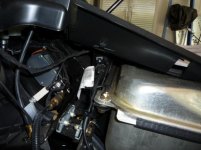
It's on the right side, near the gas tank ground bolt, towards the middle. This picture ^ has my GPS harness attached, the connector is just to the side of the BRP on the visible label.

So I'm using an old Zumo 550 until I can afford a new one, all I needed was 12 volts keyed. The BRP plug was a AMP Superseal 1.5. I bought a bag of pigtails here:

https://www.ebay.com/itm/5-Kit-2-Pin-Way-20-16-AWG-Waterproof-Connector-Wire-Harness-IP67-AMP-Superseal/232424731338?ssPageName=STRK:MEBIDX:IT&_trksid=p2057872.m2749.l2649

The only problem I had was the black and red wires were crossed on the pigtail, so that when plugged in to the Spyder, the black was hot. Heat shrink covered that up, so no big deal.

So that's another one for the books. Maybe it'll help someone else at some point in time?!
 
Hi hOgr1der,
Did you give up on the BRP Connect GPS? I have a 2018 RTL like yours, and I am using the dash for GPS and having a difficult time keeping it user friendly. It just seems so clunky using it through the phone. What was your impression of BRP Connect?
 
Didn't even bother with it. I like a standalone GPS, the Zumo being one of the most rugged I've ever used. Waterproof, too. From what I garner, the BRP Connect relies on your phone to do anything. I'm not really up to speed on what phones do and don't do nowadays, but unless the phone has an actual GPS receiver that talks to the BRP Connect, then if you lose network connectivity you are dead in the water. Some places I go have no network for many many miles.
 
I learned many years ago that trying to create a route on a Garmin unit was a very slow process. Using a smartphone was way easier. Making routes on either of the two GPS apps on the phone is much easier and using it in the dash is a breeze, IF you take the time to learn how to use it.

I mean, compared to the added cost and trouble to install an old Garmin unit, learning to use the new smartphone is a no brainer.
 
I'm finding Genius maps to be workable on my 2018. If you've ever used Google maps on a smartphone, or Android Auto in your car - it works the same way.
 
I routed a 5ft USB cable from the frunk to the center of the handlebar, through the blank switch plate next to the fog light switch. I have the techmount plate and mount. When I plug into my Note 9, I have the BRP Connect system available, but can go back and forth to use XM radio, Pandora, a weather radar app, and other apps on my phone. When I go back to BRP Connect, it is back where I left off. I use Sygic maps on BRP Connect. It displays on the dash and I find it to be easy to use. It also has more detail than Genius. The download for each State on Sygic is almost 10 times greater than Genius, which probably includes more POI etc. So far, it is working pretty good.
 
Thanks for the picture and insight on the plug required. I am still trying to figure out how to get the dashboard to show routes, but only using the iPhone Apple map with BRP Connect. Haven't tried any of the 3rd party mapping apps that BRP suggests. That being said, having stand-alone GPS is also nice when getting into some of the remote locations.
 
We have a Garmin 660 mounted on a dash rack I made. Its easy to use (though I only plan one days route at a time). It's in my line of sight and bluetooths to our old Sena SMH 5 perfectly.
 
I was running the Zumo 550 for a bunch of years. Toughest GPS I've ever owned. Besides being waterproof, it was pretty well armored. Due to my mistake, it once fell out of the cradle at about 15 MPH, then bounced down the road for a while. Aside from some minor nicks and scratches, it's none the worse for wear. I can just hope the 595LM is as good.
 
The Zumo 550 is tough, I use it on the bike, sled, and atv. It fell off the atv and I ran over it, scratched it up a bit, but it still works. I have mine wired to power all the time, as I like to use it even when stopped.
 
Genius Maps does not use cell service for mapping. All phones have GPS chips in them today. Download the North America map and connect to BRP Connect and you are good to go. You can still receive and make calls from your connected phone. The more I understand about BRP Connect, the more I like it.
 
Today is a good day, I woke up above ground and I learned something. I didn't know that, Thopper. I appreciate folks teaching to that level. You don't know until you know. phone isn't waterproof, so I'll still use the stand alone Zumo. As I understand it, there are a few phones that are actually waterproof now, and some that are both waterproof and rugged. I bet those cost a small fortune!
 
Hi. Which version is that??? Nuvi, Zumo? And how is viewing it in the sunlight???

I just got through installing a Garmin Zumo 595LM on a Tri-Axis mount. I gained a whole new respect for the folks that work on these Spyders for a living! Fishing that monstrous cable through the steering head port was a real PITA.

I use Garmin Zumo stand alone GPS for a couple of features. They are pretty much water proof, and the case is rugged. I'm speaking from my experience with the old Garmin Zumo 550 that this GPS replaced. The Zumo motorcycle specific GPS units are glove friendly, full daylight bright, and once you learn the software fairly easy to use. Some folks have trouble with the software but you get out of it what you put into it.

The screens are optimized to be readable in full sun. As with any screen, they occasionally get hard to see at certain angles, but from what I've seen a cell phone would have been unreadable long before you can't see the screen on the Zumo series. They are made brighter than the Nuvi automobile GPS units because they are specifically for motorcycles, even though they offer a car mount. They do well in cars too.
 
My winter job will be to come up with a mount for my zumo 550. I hate buying anoth GPS when my 550 has worked for years!

Mr Lonestar2112,

I opted for the updated version 595LM for one reason alone. On auto GPS units I found the next turn guidance a life saving advantage I didn't have with the Zumo 550. I experienced this in Tulsa Oklahoma, where there was a bunch of lanes of traffic going one way at high speeds, and short notification as far a signs as to where your next turn was. You knew from the GPS where the turn was, it just helps a bunch to know the options on which lanes make that turn. Hence the upgrade. I do believe the 550 screen is brighter though. My 550 is going to be gifted to someone without a GPS on their bike (as soon as the 595LM proves itself).
 
The genius maps app. works great. It is nice to have your route on the Spyder panel and not a clunky GPS hanging on the handlebars. Since the phone is in the frunk it is waterproof.\ (put it in a plastic bag if you like). Again, BRP/Phone Genius is not dependent on cell service, you download maps, ie. North America, and you are good to go. You can switch back and forth from the main Spyder screen to maps etc. with a press of the app. handle bar switch. The system really works very well.
 
I just got through installing a Garmin Zumo 595LM on a Tri-Axis mount. I gained a whole new respect for the folks that work on these Spyders for a living! Fishing that monstrous cable through the steering head port was a real PITA.

I use Garmin Zumo stand alone GPS for a couple of features. They are pretty much water proof, and the case is rugged. I'm speaking from my experience with the old Garmin Zumo 550 that this GPS replaced. The Zumo motorcycle specific GPS units are glove friendly, full daylight bright, and once you learn the software fairly easy to use. Some folks have trouble with the software but you get out of it what you put into it.

The screens are optimized to be readable in full sun. As with any screen, they occasionally get hard to see at certain angles, but from what I've seen a cell phone would have been unreadable long before you can't see the screen on the Zumo series. They are made brighter than the Nuvi automobile GPS units because they are specifically for motorcycles, even though they offer a car mount. They do well in cars too.

I' going to have a dealer mount my Tri-Axis bars on Monday. I read somewhere that the existing mount for my Zumo on my 2017 RT Limited won't work with them. What mount did you use? I put in a call to Lamonster yesterday, but he hasn't responded yet. Thanks.
 
https://can-am.brp.com/content/cana...xis-adjustable-handlebar-without-harness.html

I used this one. It comes without the harness, which is supplied with the new GPS 595LM cradle. The cradle wiring is the same as the Can Am OEM cradle wiring, but there is some hookup soldering you will need to do on the end connections, depending on if you want to route your GPS through the Spyder dash and sound system. I didn't, so I just hooked it up to 12 volts and it was good to go.
 
https://can-am.brp.com/content/cana...xis-adjustable-handlebar-without-harness.html

I used this one. It comes without the harness, which is supplied with the new GPS 595LM cradle. The cradle wiring is the same as the Can Am OEM cradle wiring, but there is some hookup soldering you will need to do on the end connections, depending on if you want to route your GPS through the Spyder dash and sound system. I didn't, so I just hooked it up to 12 volts and it was good to go.

Thanks a lot. I didn't see that one.
 
Back
Top