Yes. On the Samsung phone, once you make a USB connection, it asks you how you want to control that USB connection (this device or connected device controls the connection; is the connection only for charging or for transferring files/Android Auto, etc.). It pops up a notification where you can then pull down the notifications list (drag down from the upper left on your phone and it displays a list of running apps and notifications) and select the USB connection notification to open your USB settings and make your selections/adjustments.
HOWEVER, I take back what I said about this USB setting choice making all well. It worked OK in my garage, but I went out on a 100 mile ryde this morning and it went back to the constant connecting/disconnecting BS almost immediately. I tried several things during the ryde to fix it, but in the end had to UNINSTALL the BRP app just to get some semblance of control over my phone (so that I could navigate using my Rever app and keep the phone charged using the USB cable) and complete the ryde. I shoulda figured BRP would release a half-*** software update that **** all over the Android community and is essentially less than worthless because now I have to figure out how to disable the Spyder from constantly looking for the BRP app when I plug in for power... The Spyder is AWESOME, OTHER than the very poor connectivity software. As others have noted, Bluetooth connectivity (and CarPlay/AA) have been working pretty flawlessly for a long time in cars - very disappointing that this really doesn't work better - or at all, frankly!
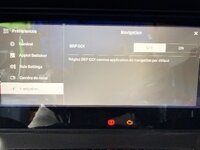
Edit: confirmed I was able to go into Preferences/Nav Settings on the Spyder and switch it back to "carplay" mode for Nav so that it doesn't force connect to BRP Go app. It DOES identify that you've then connected to a BRP app-capable phone when you plug into your android phone and an applet pops up on the Spyder screen asking if you want to switch to BRP Go for nav. Pressing Cancel on that makes it go away. Not sure if it will ask for that EVERY TIME you plug in your phone? Does BRP not have any actual user-testing of their software update decisions?