
• There were many reasons for the change of the site software, the biggest was security. The age of the old software also meant no server updates for certain programs. There are many benefits to the new software, one of the biggest is the mobile functionality. Ill fix up some stuff in the coming days, we'll also try to get some of the old addons back or the data imported back into the site like the garage. To create a thread or to reply with a post is basically the same as it was in the prior software. The default style of the site is light colored, but i temporarily added a darker colored style, to change you can find a link at the bottom of the site.

NHTSA Campaign 26V575000 - 2025-2026 Spyder RT, F3, & Canyon freezing cluster fix issued

Just got recall notice via email. Says OTA was available starting 9/16/2026.

I just got an email with a link to:


Which has this information:

Which models are involved?
MY24 to MY27 Can-Am Spyder F3
MY24 to MY27 Can-Am Spyder RT
MY25 to MY27 Can-Am Canyon

It does say the update is available to download over the air.

Edit: I received the email at 7:59 am this morning, October 14.
 
Last edited:
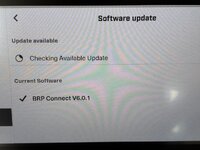
Just finished the update.

The download worked fine with just having the Spyder connected to the Battery Tender Jr, but when I got to the Install step, the button to start the install didn't work.
Once I started the engine, the install started and completed.
It did ask me to restart the Spyder one time.

V6.0.1Update.jpeg

It then checked for more updates, but didn't find any.

I did the update the same way I've done previous updates, using my home Wifi network.
I have high speed internet from Spectrum cable and have my own Wifi routers in my home.
 
I down loaded the update while the bike was not running with my small charger hooked up. It down loaded OK but the "Install Update" box was grayed out. I shut the ignition off as the battery terminal voltage was 11.9 and left it on the charger for an hour. Came back and tried the update again and it was grayed out still. Started the bike and it finally allowed me to perform the upgrade. No surprises other than it did change the audio output to speakers vs. headset that I always use.
Same thing happened to me but my voltage was higher. From what I saw on the internet in order for the update to happen the battery voltage needs to be a certain threshold. The alternator brought it up to to that threshold.
 
Same thing happened to me but my voltage was higher. From what I saw on the internet in order for the update to happen the battery voltage needs to be a certain threshold. The alternator brought it up to to that threshold.

That's been my experience on previous updates. You can find it/download it on battery, but the engine needed to be running to do the actual installation.
 
On mine, it was greyed out the installation after downloading. It is always on the tender. However, I turned the ignition off, took the key out and off some distance, ran some errands for a couple of hours, then came back and completed. I didn’t start the engine.
 
Still no update showing on my 2024 with v4.1.0 firmware. Anyone else still not getting the update? I really don't want to take it to dealer.

I have a 2026 F3s running v5.1.0 and I have not been presented with the update to v6.0.1 either. I've been checking several times a week since the release in Sept. It's very annoying, because I was able to do the update to v5.1.0 shortly after I bought the bike with no issues. I really hate having to take it to the dealer, that defeats the whole point of OTA updates, but I might have to, because my screen has frozen up and rebooted while riding several times and a bluetooth fault causes disconnects from CarPlay nearly every ride. I got the official BRP recall email and mailer last week, so I know my bike is on their list.
 
I have a 2026 F3s running v5.1.0 and I have not been presented with the update to v6.0.1 either. I've been checking several times a week since the release in Sept. It's very annoying, because I was able to do the update to v5.1.0 shortly after I bought the bike with no issues. I really hate having to take it to the dealer, that defeats the whole point of OTA updates, but I might have to, because my screen has frozen up and rebooted while riding several times and a bluetooth fault causes disconnects from CarPlay nearly every ride. I got the official BRP recall email and mailer last week, so I know my bike is on their list.

Are you sure you have a good WiFi connection? Maybe delete your connection and reinstall it. Also, make sure you have at least 13v on your battery. I had to install mine while the engine was running and the alternator was charging the battery.
 
I have a 2026 F3s running v5.1.0 and I have not been presented with the update to v6.0.1 either. I've been checking several times a week since the release in Sept. It's very annoying, because I was able to do the update to v5.1.0 shortly after I bought the bike with no issues. I really hate having to take it to the dealer, that defeats the whole point of OTA updates, but I might have to, because my screen has frozen up and rebooted while riding several times and a bluetooth fault causes disconnects from CarPlay nearly every ride. I got the official BRP recall email and mailer last week, so I know my bike is on their list.
If you are having screen blackout problems then I would take it to the dealer to get updated if you cannot do it yourself. It's a NHTSA recall because it's a safety issue.

It takes about 15 minutes to do, and the dealer doesn't have to touch any other part of your bike if you don't want them to.
 
Going to dealer this AM. WiFi on this thing sucks. If I connect to my phone's hotspot, I can see the hotspot icon turning on and off, and the bike says disconnected/reconnected constantly. If I use my home WiFi, half the time it fails then says the password is wrong, when it clearly isn't. I have tried using phone hotspot where there's few WiFi networks around, since there are dozens that show up at my house, but same thing. It just doesn't work.
 
That's been my experience on previous updates. You can find it/download it on battery, but the engine needed to be running to do the actual installation.
Or have it on a Battery Tender. My Battery Tender took about 10-20 mins to get to 'green' and then the "install' button was no longer greyed-out.
 
Dealer updated it this morning, wasn't too bad. V6.0.1. When I got it home, it said "UPDATE AVAILABLE". JFC. Available update was v6.0.1 as well. I went ahead and let it download and install. After it rebooted, the check for updates doesn't show anything available now. Somehow the OTA v6.0.1 was "different enough" I guess for the bike to assume it superseded the v6.0.1 that was already loaded. Anyway it seems fine so far and isn't telling me it needs another update.
 
Dealer updated it this morning, wasn't too bad. V6.0.1. When I got it home, it said "UPDATE AVAILABLE". JFC. Available update was v6.0.1 as well. I went ahead and let it download and install. After it rebooted, the check for updates doesn't show anything available now. Somehow the OTA v6.0.1 was "different enough" I guess for the bike to assume it superseded the v6.0.1 that was already loaded. Anyway it seems fine so far and isn't telling me it needs another update.
That's so weird that it took the OTA update after it was just updated, thanks for sharing! Glad to hear it worked at least. I have an appt this weekend for dealer to install the update on mine.
 
That's so weird that it took the OTA update after it was just updated, thanks for sharing! Glad to hear it worked at least. I have an appt this weekend for dealer to install the update on mine.

Be curious if it happens to you too :) I suppose if I had turned it off and checked later maybe it would have gone away, but I figured I might as well get it over with if it was going to keep on appearing. I was dreading the dealer experience, but they got it done in less than 30 minutes.
 
Be curious if it happens to you too :) I suppose if I had turned it off and checked later maybe it would have gone away, but I figured I might as well get it over with if it was going to keep on appearing. I was dreading the dealer experience, but they got it done in less than 30 minutes.
I'll let you know how it goes. I've rarely had good experiences with dealership service depts. They usually end up frustrating me in some way or they'll break something else that wasn't broken before. Hence why I do all the maintenance and repairs that I can on my own. This is straight forward enough that I'm hoping it will be in and out like your experience. They told me they've done several of these updates on other Spyders already and it all went fine, so here's hoping.
 
Dealer updated it this morning, wasn't too bad. V6.0.1. When I got it home, it said "UPDATE AVAILABLE". JFC. Available update was v6.0.1 as well. I went ahead and let it download and install. After it rebooted, the check for updates doesn't show anything available now. Somehow the OTA v6.0.1 was "different enough" I guess for the bike to assume it superseded the v6.0.1 that was already loaded. Anyway it seems fine so far and isn't telling me it needs another update.
Same here, last I looked. I'll look again, maybe try to ride up right next to the house and see about a wifi connection to let it update the update. Heck if I know. 🙃

Sarah
 
Back
Top