• There were many reasons for the change of the site software, the biggest was security. The age of the old software also meant no server updates for certain programs. There are many benefits to the new software, one of the biggest is the mobile functionality. Ill fix up some stuff in the coming days, we'll also try to get some of the old addons back or the data imported back into the site like the garage. To create a thread or to reply with a post is basically the same as it was in the prior software. The default style of the site is light colored, but i temporarily added a darker colored style, to change you can find a link at the bottom of the site.

It's Heeeeerrrrrrreeeeeeeee!!!!!!! Navigation!

hogmemberisold

Active member
Ok,

Last night BRP Go! update on my android phone and gave me an indication in the app that navigation should be available now on the Spyder....

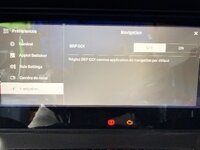
This morning I pulled the bike outside closer to the 2G wifi and now the bike is updated to V5.## software and shows a heading of "Navigation" in the menu.

We are heading out of town this morning so I will mess with it after getting back...

Just a heads up to those with a 10.25" display... It's Heeeeerrrrrrrreeeeeee!!
 
Actually it is a connection between Android or Apple phones and the BRP GO! app on the phones that allows the embedded navigation of the app to show in the Spyder cluster, not the full Android Auto mais certainly a solution for Android phones owners. Only applies to the 2024 + new 10.25" dashboard, which has to be updated to V5.1.0 from the previous 4.1.0
 
Installed the update via wifi. Downloaded the BRP GO app and registered. Connected my Samsung phone via Bluetooth. Opened the applet to navigation. Opened the BRP GO app on my phone. Plugged in a USB A to USB C cable. The app connects for a split second and then disconnects. The phone switches from charging only to transfer data, back and forth for a minute or so until the app says it can't connect. I've tried several different cables to no avail.
 
Updated on 2026 s2s ....and now there's no Apple car play.:(
I have provided you with the solution in your other post here :
 
Installed the update via wifi. Downloaded the BRP GO app and registered. Connected my Samsung phone via Bluetooth. Opened the applet to navigation. Opened the BRP GO app on my phone. Plugged in a USB A to USB C cable. The app connects for a split second and then disconnects. The phone switches from charging only to transfer data, back and forth for a minute or so until the app says it can't connect. I've tried several different cables to no avail.
I have a Galaxy S22U and experienced the same thing after updating for the nav. I was able to fix it by going into USB settings (drag down from top left corner and select USB connection) while connected and changing it to "Controlled by Connected device" (vs default "Controlled by This device"). Once I changed that it auto switched to transferring files/Android Auto (from charging only) and all was well...
 
I have a Galaxy S22U and experienced the same thing after updating for the nav. I was able to fix it by going into USB settings (drag down from top left corner and select USB connection) while connected and changing it to "Controlled by Connected device" (vs default "Controlled by This device"). Once I changed that it auto switched to transferring files/Android Auto (from charging only) and all was well...
Thank you! I will give that a shot.
 
Updated on 2026 s2s ....and now there's no Apple car play.:(
If you want to go back to apple carplay simply go back into preferences and scroll down to navigation. Turn it off and the apple carplay applet reappears. Back to brp-go? turn navigation back on.
 
I have a Galaxy S22U and experienced the same thing after updating for the nav. I was able to fix it by going into USB settings (drag down from top left corner and select USB connection) while connected and changing it to "Controlled by Connected device" (vs default "Controlled by This device"). Once I changed that it auto switched to transferring files/Android Auto (from charging only) and all was well...
Are you referring the USB settings on your phone?
I can get to the point where it tells me I have a bad cable or to clean ports?
I'm not good with technology... sorry for my question.
 
Are you referring the USB settings on your phone?
I can get to the point where it tells me I have a bad cable or to clean ports?
I'm not good with technology... sorry for my question.
Yes. On the Samsung phone, once you make a USB connection, it asks you how you want to control that USB connection (this device or connected device controls the connection; is the connection only for charging or for transferring files/Android Auto, etc.). It pops up a notification where you can then pull down the notifications list (drag down from the upper left on your phone and it displays a list of running apps and notifications) and select the USB connection notification to open your USB settings and make your selections/adjustments.

HOWEVER, I take back what I said about this USB setting choice making all well. It worked OK in my garage, but I went out on a 100 mile ryde this morning and it went back to the constant connecting/disconnecting BS almost immediately. I tried several things during the ryde to fix it, but in the end had to UNINSTALL the BRP app just to get some semblance of control over my phone (so that I could navigate using my Rever app and keep the phone charged using the USB cable) and complete the ryde. I shoulda figured BRP would release a half-*** software update that **** all over the Android community and is essentially less than worthless because now I have to figure out how to disable the Spyder from constantly looking for the BRP app when I plug in for power... The Spyder is AWESOME, OTHER than the very poor connectivity software. As others have noted, Bluetooth connectivity (and CarPlay/AA) have been working pretty flawlessly for a long time in cars - very disappointing that this really doesn't work better - or at all, frankly!

Edit: confirmed I was able to go into Preferences/Nav Settings on the Spyder and switch it back to "carplay" mode for Nav so that it doesn't force connect to BRP Go app. It DOES identify that you've then connected to a BRP app-capable phone when you plug into your android phone and an applet pops up on the Spyder screen asking if you want to switch to BRP Go for nav. Pressing Cancel on that makes it go away. Not sure if it will ask for that EVERY TIME you plug in your phone? Does BRP not have any actual user-testing of their software update decisions?

 
Last edited:
@Mandorallen, I was going to try your suggestion with the USB connected device, but when I went to connect my phone, it doesn't even try to connect any more. So I thought I would try a different phone. That one doesn't try to connect either!

The phones were a Samsung S24 and a Pixel 6. I also tried 5 different cables. I would agree that the software is lacking!!
 
Yes. On the Samsung phone, once you make a USB connection, it asks you how you want to control that USB connection (this device or connected device controls the connection; is the connection only for charging or for transferring files/Android Auto, etc.). It pops up a notification where you can then pull down the notifications list (drag down from the upper left on your phone and it displays a list of running apps and notifications) and select the USB connection notification to open your USB settings and make your selections/adjustments.

HOWEVER, I take back what I said about this USB setting choice making all well. It worked OK in my garage, but I went out on a 100 mile ryde this morning and it went back to the constant connecting/disconnecting BS almost immediately. I tried several things during the ryde to fix it, but in the end had to UNINSTALL the BRP app just to get some semblance of control over my phone (so that I could navigate using my Rever app and keep the phone charged using the USB cable) and complete the ryde. I shoulda figured BRP would release a half-*** software update that **** all over the Android community and is essentially less than worthless because now I have to figure out how to disable the Spyder from constantly looking for the BRP app when I plug in for power... The Spyder is AWESOME, OTHER than the very poor connectivity software. As others have noted, Bluetooth connectivity (and CarPlay/AA) have been working pretty flawlessly for a long time in cars - very disappointing that this really doesn't work better - or at all, frankly!

Edit: confirmed I was able to go into Preferences/Nav Settings on the Spyder and switch it back to "carplay" mode for Nav so that it doesn't force connect to BRP Go app. It DOES identify that you've then connected to a BRP app-capable phone when you plug into your android phone and an applet pops up on the Spyder screen asking if you want to switch to BRP Go for nav. Pressing Cancel on that makes it go away. Not sure if it will ask for that EVERY TIME you plug in your phone? Does BRP not have any actual user-testing of their software update decisions?
Thanks for a great answer I could understand..
I thinking of uninstalling the amp.
I used Calamoto and Bluetooth music today and the BRP app kept popping up on the ride and startups.
Sad...
 
Well, as everyone else is finding out, I messed with this for a long time, using different cables (buying certified USB-IF 3.1), enabling/changing Pixel 9 Pro settings, etc... Just doesn't stay connected.

I'll give feedback on the BRP Go app, we all need to that!

I sure was hoping to have a on-board backup for our GPS.
 
Attached is a link to the BRP announcement.

Ok,

Last night BRP Go! update on my android phone and gave me an indication in the app that navigation should be available now on the Spyder....

This morning I pulled the bike outside closer to the 2G wifi and now the bike is updated to V5.## software and shows a heading of "Navigation" in the menu.

We are heading out of town this morning so I will mess with it after getting back...

Just a heads up to those with a 10.25" display... It's Heeeeerrrrrrrreeeeeee!!
 
I downloaded the update,everything went smoothly, but it shows a picture of the 23 that I had, the F3 base model, said I can use navigation but it wouldn't show on the screen,l have the 10.25 screen, don't quite know how to figure it out so I'm going to take it to the dealership tomorrow and ask them,their not open today, hopefully it doesn rain🤞
 
I downloaded the update,everything went smoothly, but it shows a picture of the 23 that I had, the F3 base model, said I can use navigation but it wouldn't show on the screen,l have the 10.25 screen, don't quite know how to figure it out so I'm going to take it to the dealership tomorrow and ask them,their not open today, hopefully it doesn rain🤞
On your phone, start the BRP Go app. (Not attached to the bike). At the bottom of the screen, tap on Vehicle & Devices. Then go to the My Vehicles section. Add your current vehicle. (You'll need the vin number). After that, you can delete the previous vehicle.
 
It shows that I have the right vehicle on there but the picture is showing the wrong one, I can't get it to change, I'm going to take it to the dealership tomorrow, I even deleted the BRP app and reinstalled it and it connected right to it but it still shows the wrong picture of the bike which is showing a small screen, it shows the correct VIN number on BRP website
 
Back
Top